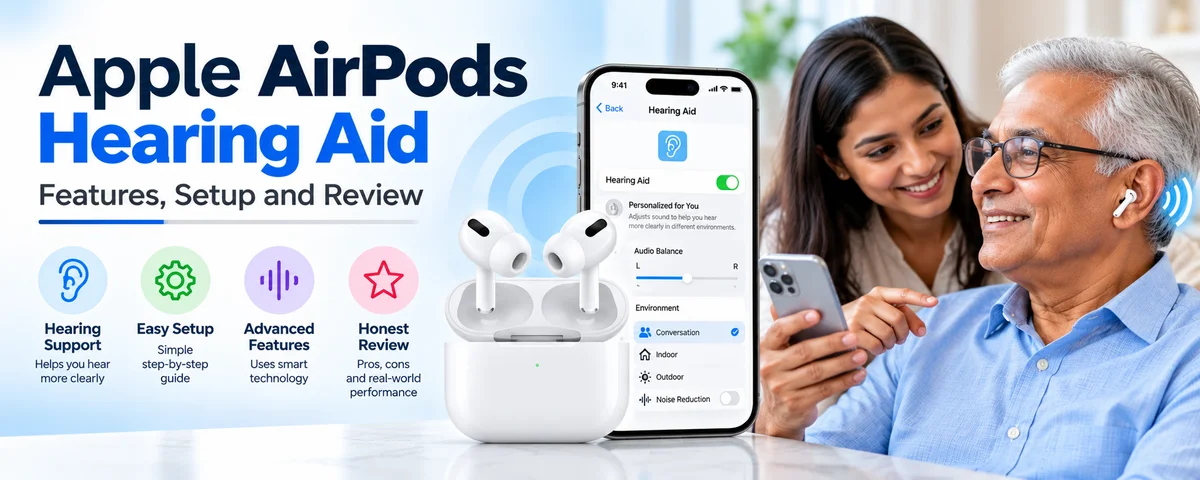
Apple AirPods Hearing Aid: Features, Setup and Review
For years, hearing aids meant a trip to a clinic, a long fitting process and a large bill. Apple changed that when it turned the AirPods Pro into a clinical-grade hearing assistance tool. The Apple AirPods hearing aid feature lets people with mild to moderate hearing loss boost the sounds around them using earbuds they may already own.
At EarMart, we get a lot of questions about this feature. Is it real? Is it safe? Can it replace a traditional hearing aid? This guide covers how the Apple AirPods hearing aid works, who should use it, and where it falls short.
What Is the Apple AirPods Hearing Aid Feature?
The Apple AirPods hearing aid feature is a software function built into the AirPods Pro 2 and AirPods Pro 3. When you turn it on, your earbuds amplify sounds and voices around you, adjusted to your own hearing profile. Apple designed it as an over-the-counter hearing aid for adults who perceive mild to moderate hearing loss.
The feature works with an iPhone or iPad running iOS 26 or iPadOS 26 or later. It first arrived in the United States after regulators cleared it in late 2024, and Apple has been expanding it to more countries ever since. Because rules for over-the-counter hearing devices differ from place to place, availability varies by country. Check Apple’s official country list before you buy.
How Does It Work?
The setup has three parts: a hearing test, a personal hearing profile and real-time sound adjustment.
1. The hearing test. You wear your AirPods Pro and take a short test on your iPhone, usually about five minutes. You tap whenever you hear a tone, and the test checks different frequencies in each ear.
2. The hearing profile. The results create a personalized profile showing which pitches you hear well and which are harder for you. If you already have an audiogram from a hearing professional, you can load that instead.
3. Real-time adjustment. With the hearing aid turned on, the microphones pick up the world around you. The AirPods process that sound using your profile and play it back, boosting the frequencies you struggle with. Conversations, TV dialogue and background sounds all become easier to follow.
Your profile can also be applied to music, movies, games and phone calls, so everything you play sounds clearer without manual tweaking.
Key Features Worth Knowing
Personalized sound amplification
The main benefit is amplification tuned to you, not a generic volume boost. Because the sound is shaped around your hearing test, speech often comes through more clearly instead of just louder.
Active Hearing Protection and Loud Sound Reduction
The AirPods can also lower very loud noises in Transparency and Adaptive modes. This protects your ears at concerts, in traffic or at work sites. For people worried about further hearing damage, this is a useful extra.
Built-in hearing test
Even if you never use the hearing aid mode, the test is a handy way to check your hearing from home. It is not a medical diagnosis, but it is a good first signal that you should see a professional.
Seamless Apple ecosystem integration
Your settings sync across your Apple devices. Switching from iPhone to iPad to Mac is smooth, and you can adjust the hearing aid from Control Center or the AirPods settings.
Discreet design
This may be the most underrated benefit. Many people avoid hearing aids because of stigma. Nobody looks twice at someone wearing AirPods, so there is less self-consciousness about wearing them.
Who Should Use the Apple AirPods Hearing Aid?
The feature suits adults, aged 18 and over, who notice mild to moderate hearing difficulty. Typical signs include:
Asking people to repeat themselves
Struggling to follow conversations in restaurants or busy rooms
Turning the TV volume higher than others prefer
Missing quiet sounds like birds or soft speech
Having trouble on phone calls
If you already own AirPods Pro 2 or Pro 3 and have light hearing loss, trying the feature costs you nothing extra. If you are buying new, this feature is a strong reason to choose the Pro line over standard AirPods, which do not include it.
Who Should Not Rely on It?
Honesty matters, and at EarMart we would rather you make the right choice than the trendy one. The AirPods hearing aid is not the right tool for everyone.
Severe or profound hearing loss. The feature is designed for mild to moderate loss. Severe loss usually needs a prescription hearing aid with stronger amplification and professional fitting.
Sudden hearing loss. If your hearing drops suddenly in one or both ears, see a doctor immediately. This can be a medical emergency and should not be handled with a gadget.
Ear pain, drainage or dizziness. These symptoms call for a medical exam before any hearing device.
Children under 18. The feature is built for adults only.
If the hearing test suggests your loss is beyond the supported range, Apple will tell you the feature may not be suitable and recommend seeing a professional.
AirPods Hearing Aid vs. Traditional Hearing Aids
Here is how they compare in everyday terms.
Cost. Prescription hearing aids often cost well over a thousand dollars per pair, and premium models cost much more. AirPods Pro cost a fraction of that, and you also get a premium pair of earbuds for music and calls.
Fit and comfort. Traditional aids are custom-fitted by a professional. AirPods come with multiple ear tip sizes, but they are still a consumer product and may not stay secure for every ear shape or activity.
Battery life. Hearing aids are built to last all day, and many are rechargeable or use small replaceable batteries. AirPods give you several hours per charge, so heavy all-day users may need to top up from the case.
Power and features. Prescription devices can handle a wider range of hearing loss and offer more fine-tuning from an audiologist. Many also have directional microphones and telecoil support.
Support. With a clinic, you get follow-up care, adjustments and cleaning. With AirPods, you are mostly on your own, though Apple’s support is solid.
The bottom line: AirPods are a great entry point for mild loss, but they do not replace the professional care that more serious hearing loss requires.
How to Set Up the Apple AirPods Hearing Aid
Setup is simple, and it takes about ten minutes.
Make sure your iPhone or iPad is updated to iOS 26 or iPadOS 26 or later.
Connect your AirPods Pro 2 or AirPods Pro 3 and put them in your ears.
Open Settings and tap your AirPods name.
Choose the hearing health option and start the hearing test.
Follow the prompts in a quiet room, tapping when you hear each tone.
Review your results and turn on the hearing aid feature.
Adjust settings, such as Transparency preferences, to suit your surroundings.
Use a quiet room for the best accuracy. A noisy background will skew your results. Choose the right ear tips too. A poor seal weakens both the test and the sound quality.
Tips for Getting the Best Results
Choose the right ear tip size. A snug seal improves amplification and comfort. Use the ear tip fit test in your settings.
Keep your AirPods clean. Wax and debris can block the microphones and speakers. Wipe them gently with a dry, soft cloth.
Update your software. Apple keeps improving the feature, so install updates when they arrive.
Give yourself time to adjust. Your brain needs a few days to get used to hearing sounds you have been missing. Start with short sessions in quiet places.
Retest regularly. Hearing changes over time. Repeat the test every so often to keep your profile accurate.
Is the Apple AirPods Hearing Aid Worth It?
For many people, yes. If you have mild to moderate hearing loss and want an affordable, discreet and tech-friendly solution, it offers excellent value. It is also a smart first step if you have been putting off getting help because of cost or stigma.
If your hearing is more seriously affected, treat the AirPods as a supplement at best and see an audiologist for proper care. The best approach is often a mix: use the test as a prompt to get checked, then decide on a path with a professional.
At EarMart, we believe better hearing should be accessible. Whether you choose AirPods or a traditional device, the most important step is acting on hearing changes early.
Final Thoughts
The Apple AirPods hearing aid feature has made hearing assistance more approachable than ever. It is not a cure-all, and it will not suit every hearing need, but for the right user it can make conversations clearer and everyday life easier.
Frequently Asked Questions (FAQs)
1. Which AirPods have the hearing aid feature?
The hearing aid feature is available on AirPods Pro 2 and AirPods Pro 3 when paired with a compatible iPhone or iPad running iOS 26 or iPadOS 26 or later. Standard AirPods and older models do not support it.
2. Is the AirPods hearing aid FDA approved?
Yes. In the United States, the feature received FDA authorization as an over-the-counter hearing aid for adults with perceived mild to moderate hearing loss. Other countries have their own approval processes.
3. Can AirPods replace regular hearing aids?
For mild to moderate hearing loss, they can be a convenient alternative. For severe loss, they are not a replacement, and a prescription hearing aid fitted by a professional is the safer choice.
4. Do I need a prescription to use the AirPods hearing aid?
No. It is an over-the-counter feature, so you can set it up yourself after taking the built-in hearing test.
5. How long does the hearing test take?
The test takes about five minutes in a quiet environment.
6. Can I use my existing audiogram?
Yes. If a hearing professional has given you an audiogram, you can use it to set up the hearing aid feature instead of taking the in-app test.
7. Does the feature work on Android phones?
No. The hearing aid and hearing test features require an Apple device such as an iPhone or iPad.
8. Is the AirPods hearing aid available in every country?
No. Availability depends on local regulations, and Apple has been adding new countries gradually. Check Apple’s official availability list for your region.
9. How long does the battery last?
Battery life depends on your settings and usage. Expect several hours per charge, with extra charges from the case for longer days.
10. Can I wear them all day?
Many people do, with short charging breaks. If you need heavy all-day use, a traditional hearing aid may be more practical.